
Key Takeaways
- Small and medium businesses face 43% of all cyberattacks, making cybersecurity controls critical for survival
- Five fundamental cybersecurity controls form the foundation: access management, endpoint protection, network security, data protection, and incident response
- Multi factor authentication alone blocks 99.9% of automated attacks, making it the highest-impact control to implement first
- The CIS Critical Security Controls framework provides a proven roadmap for SMBs to build effective cybersecurity programs
- Implementation should start with high-impact, low-cost controls before advancing to more complex security measures
When cybercriminals target small businesses, they’re not looking for the biggest prize—they’re looking for the easiest one. The harsh reality is that SMB's have become the preferred targets for cyber threats, accounting for 43% of all cyberattacks according to Verizon’s Data Breach Investigations Report. Yet many business owners still operate under the dangerous misconception that they’re too small to be noticed by cybercriminals.
The statistics paint a sobering picture: 60% of SMB's close their doors within six months of experiencing a major cyber incident. With average business interruption costs reaching $370,000 for small and medium businesses, the financial impact extends far beyond the immediate technical damage. These aren’t just numbers—they represent real businesses, real livelihoods, and real communities affected by preventable cybersecurity incidents.
This comprehensive guide will walk you through the essential cybersecurity controls that every small business must implement to protect critical assets and ensure business continuity. Rather than overwhelming you with complex enterprise-level solutions, we’ll focus on practical, cost-effective measures that deliver maximum security return on investment.
Why SMBs Need Essential Cybersecurity Controls
The cyber landscape has fundamentally shifted, and small and medium businesses can no longer afford to treat cybersecurity as an afterthought. While large enterprises have dedicated security teams and substantial budgets, small businesses face the same sophisticated threats with fraction of the resources.
The Target on Your Back
Cybercriminals specifically target SMB's because they often lack robust security infrastructure while still processing valuable customer information and maintaining access to critical data. Your business doesn’t need to be a household name to attract unwanted attention—you just need to process payments, store customer data, or connect to the internet.
Recent threat intelligence shows that ransomware groups actively scan for vulnerable networks, often using automated tools to identify easy targets. Once they gain access to your corporate network, attackers can move laterally through network devices, steal intellectual property, and encrypt vital data before demanding payment for its return.
Financial Impact and Business Continuity
The financial consequences of cyber incidents extend far beyond the immediate technical damage. Consider these costs:
- Business interruption: Lost revenue during system downtime
- Data recovery: Professional services to restore critical data
- Legal fees: Compliance violations and potential lawsuits
- Reputation damage: Lost customer trust and future business
- Regulatory fines: GDPR, HIPAA, CCPA, and other industry-specific penalties
Regulatory Compliance Requirements
Modern businesses must navigate an increasingly complex landscape of data protection regulations. Whether you’re handling customer payment information, personal data, or operating in regulated industries, compliance requirements demand specific cybersecurity controls.
Government agencies have recognized the unique challenges facing small and medium businesses and developed tailored guidance. The National Institute of Standards and Technology (NIST) Cybersecurity Framework and the Center for Internet Security (CIS) Controls provide structured approaches that scale to organizational size and resources.
The Five Essential Cybersecurity Controls
The Center for Internet Security has identified critical security controls that provide the most significant security improvement for organizations of all sizes. For small and medium businesses, focusing on Implementation Group 1 (IG1) controls delivers maximum security return on investment while remaining manageable with limited resources.
These five essential controls work together to create a layered defense strategy, often called “defense in depth.” Each control addresses different attack vectors and, when properly implemented, creates multiple barriers that cybercriminals must overcome to successfully compromise your business.
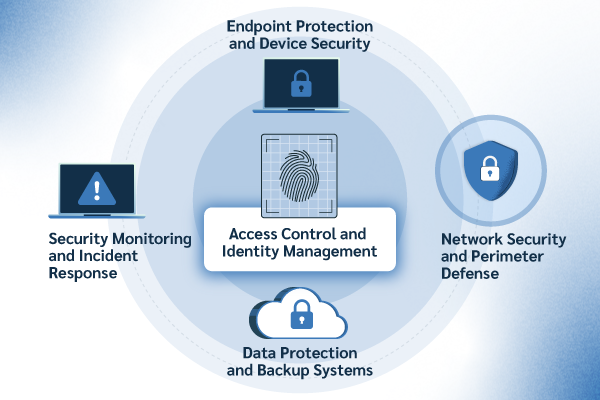
1. Access Control and Identity Management
Access control serves as your first line of defense against unauthorized individuals attempting to gain access to sensitive data and critical systems. This control focuses on ensuring only those who need access to specific resources can obtain it, and only for as long as necessary.
Multi Factor Authentication Implementation
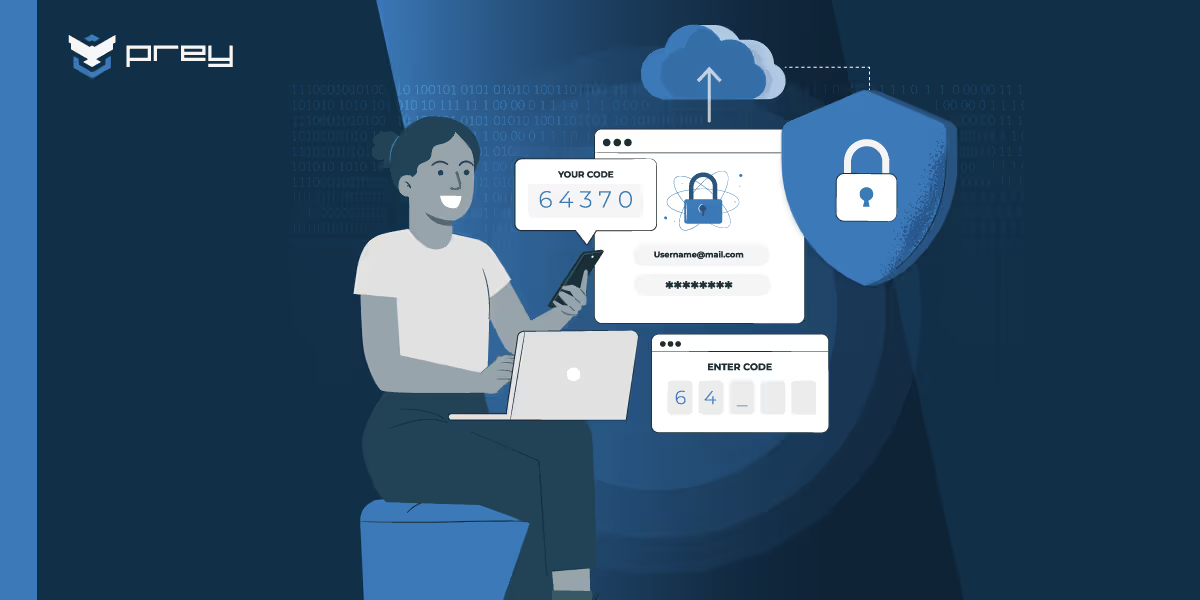
MFA represents the single most effective security control small businesses can implement. By requiring users to provide something they know (password), something they have (smartphone), or something they are (fingerprint), MFA blocks 99.9% of automated attacks.
Popular MFA solutions for SMB's include:
- Microsoft Authenticator: Integrated with Office 365 and Azure
- Google Authenticator: Works with Google Workspace and third-party applications
- Duo Security: Comprehensive solution with phone-based authentication
- Authy: User-friendly option with backup and sync capabilities
Strong Password Policies
Weak login credentials remain a primary entry point for cybercriminals. Implement password policies requiring:
- Minimum 15 characters with complexity requirements
- Unique passwords for each account and system
- Regular password changes for privileged accounts
- Immediate password changes when employees leave
Password Managers for Business
Password managers eliminate the burden of remembering complex unique passwords while significantly improving security posture. Enterprise-grade solutions include:
- 1Password Business: Team sharing and administrative controls
- Bitwarden Business: Open-source solution with enterprise features
- Dashlane Business: User-friendly interface with security monitoring
Principle of Least Privilege Access
Grant access based on job requirements and regularly review permissions. Implement role-based access controls that automatically provision appropriate permissions based on employee roles. Conduct quarterly access reviews to ensure users maintain only necessary privileges.
2. Endpoint Protection and Device Security
Every device connecting to your corporate network represents a potential entry point for malicious software and external threats. Modern endpoint protection goes far beyond traditional antivirus software to provide comprehensive threat detection and response capabilities.
Modern Endpoint Detection and Response
Traditional antivirus software relies on signature-based detection, which proves inadequate against modern threats. Endpoint Detection and Response (EDR) solutions use behavioral analysis, machine learning, and threat intelligence to identify and respond to sophisticated attacks in real-time.
Key capabilities include:
- Real-time monitoring of endpoint activities
- Automated threat response and containment
- Forensic analysis of security incidents
- Integration with broader security ecosystems
Device Encryption Requirements
Encrypt all devices containing sensitive data to protect against physical theft and unauthorized access. Operating systems provide built-in encryption capabilities:
- Windows: BitLocker encryption for business editions
- macOS: FileVault for comprehensive disk encryption
- Mobile devices: Enable encryption in device settings
Mobile Device Management for Corporate and BYOD Devices
As remote work becomes standard, managing personal devices accessing corporate resources becomes critical. Mobile Device Management (MDM) solutions allow businesses to:
- Enforce security policies on mobile devices
- Remote wipe capabilities for lost or stolen devices
- Remote Location Tracking
- Separate personal and business data
- Control application installation and usage
Regular Security Updates and Patch Management
Enable automatic updates for operating systems and applications whenever possible. Establish patch management procedures for systems requiring manual updates, prioritizing security patches and critical vulnerabilities. Maintain an inventory of all network devices and software to ensure comprehensive coverage.
3. Network Security and Perimeter Defense
Your network infrastructure represents the highway system connecting all business resources. Implementing robust network security controls protects against threats attempting to infiltrate your corporate network and prevents lateral movement once attackers gain initial access.
Next-Generation Firewalls vs Traditional Firewalls
Traditional firewalls filter traffic based on ports and protocols, while next generation firewalls provide application-aware filtering, intrusion prevention, and threat intelligence integration. Modern small businesses need NGFW capabilities to defend against sophisticated attacks that traditional firewalls cannot detect.
Key NGFW features include:
- Application control and visibility
- Intrusion detection and prevention
- Web filtering and malware protection
- SSL/TLS inspection capabilities
Network Segmentation Strategies
Isolate critical systems and limit potential damage from successful attacks through network segmentation. Simple segmentation strategies for small businesses include:
- Separate guest Wi-Fi from business networks
- Isolate point-of-sale systems and payment processing
- Create separate VLANs for different business functions
- Implement wireless access point isolation
Secure Wi-Fi Configuration
Configure wireless networks using WPA3 security standards and implement proper wireless access point management. Essential Wi-Fi security measures include:
- Strong encryption (WPA3 or WPA2-Enterprise minimum)
- Guest network isolation from business resources
- Regular password changes for wireless networks
- Disable unnecessary wireless features and protocols
VPN Implementation for Remote Workers
Virtual private network solutions encrypt internet connections and provide secure remote access to business resources. Choose VPN solutions that integrate with your existing authentication systems and support multi factor authentication MFA.
DNS Filtering and Web Protection
DNS filtering blocks access to malicious websites and prevents malware downloads. Many next generation firewalls include DNS filtering capabilities, or businesses can implement cloud-based solutions that filter malicious domains before they reach your network.
4. Data Protection and Backup Systems
Critical data represents the lifeblood of your business, making data protection controls essential for business continuity and regulatory compliance. Effective data protection encompasses both preventing unauthorized access and ensuring data availability during emergencies.
3-2-1 Backup Rule Implementation
Follow the industry-standard 3-2-1 backup strategy:
- 3 copies of critical data (original plus two backups)
- 2 different media types (local storage and cloud backup)
- 1 offsite location (cloud storage or remote facility)
This approach protects against hardware failures, natural disasters, and ransomware attacks targeting backup systems.
Data Classification and Handling Procedures
Classify data based on sensitivity and business impact to apply appropriate protection measures:
- Public: Information safe for general distribution
- Internal: Business information requiring basic protection
- Confidential: Sensitive data requiring enhanced security
- Restricted: Highly sensitive data with strict access controls
Encryption for Data at Rest and in Transit
Implement encryption to protect customer information and other vital data throughout its lifecycle. Encrypt data stored on servers, databases, and portable devices. Ensure all data transmissions use secure protocols (HTTPS, SFTP, VPN).
Cloud Backup Solutions
Cloud backup services provide automated, offsite backup data storage with enterprise-grade security. Recommended solutions include:
- Carbonite Safe: Comprehensive business backup with continuous protection
- Backblaze Business: Cost-effective unlimited cloud backup
- Veeam Cloud Connect: Enterprise-grade backup with rapid recovery
Regular Backup Testing and Recovery Procedures
Test backup systems quarterly to verify data restorability and recovery procedures. Document step-by-step recovery processes and assign specific responsibilities to team members. Measure recovery time objectives (RTO) and recovery point objectives (RPO) to ensure business continuity requirements.
5. Security Monitoring and Incident Response
Continuous monitoring enables early threat detection and rapid response to security incidents. While enterprise-level Security Information and Event Management (SIEM) systems may exceed small business budgets, scaled-down solutions provide essential monitoring capabilities.
Basic SIEM for Small Businesses
Modern SIEM solutions designed for small and medium businesses offer:
- Centralized log collection and analysis
- Automated threat detection and alerting
- Compliance reporting and documentation
- Integration with existing security tools
Log Monitoring and Retention Policies
Establish log retention policies that balance storage costs with investigative needs. Monitor critical events including:
- Failed authentication attempts
- Administrative account usage
- Network connection anomalies
- File access and modification events
Incident Response Plan Template
Develop a documented incident response plan that includes:
- Detection: How incidents are identified and reported
- Containment: Steps to limit damage and prevent spread
- Eradication: Removing threats from affected systems
- Recovery: Restoring normal operations safely
- Lessons Learned: Post-incident analysis and improvement
Set reporting procedures that specify who to contact and when. Include contact information for law enforcement, cybersecurity experts, and insurance providers.
Employee Security Awareness Training
Human error contributes to most successful cyberattacks. Implement regular cybersecurity awareness training covering:
- Phishing attacks recognition and reporting
- Safe browsing and email practices
- Social engineering tactics and defenses
- Incident reporting procedures
Vulnerability Assessment and Management
Conduct regular vulnerability assessments to identify security weaknesses before attackers exploit them. Use automated scanning tools to identify missing security patches, configuration errors, and potential entry points.
Implementation Roadmap for SMBs
Successfully implementing essential cybersecurity controls requires a phased approach that balances security improvements with business operational needs. This roadmap prioritizes high-impact, low-cost controls while building toward comprehensive security coverage.
Phase 1: Quick Wins (First 30 Days)
Start with controls that provide immediate security improvements with minimal disruption:
Week 1-2: Multi Factor Authentication
- Enable MFA on all business email accounts
- Install security apps (authenticator applications) on all devices
- Configure MFA for cloud services and critical applications
Week 3-4: Password Management and Endpoint Protection
- Deploy password managers across the organization
- Update and install anti malware software on all devices
- Enable automatic updates for operating systems and applications
Budget Consideration: $10-50 per user per month for basic security tools
Phase 2: Network Security (Days 31-60)
Week 5-6: Firewall Configuration
- Install or upgrade to next generation firewalls
- Configure network segmentation for guest access
- Implement DNS filtering services
Week 7-8: Remote Access Security
- Deploy virtual private network solutions for remote workers
- Configure secure wireless access point settings
- Establish secure remote access policies
Budget Consideration: $500-2,000 for small business firewall solutions
Phase 3: Data Protection (Days 61-90)
Week 9-10: Backup Implementation
- Establish 3-2-1 backup strategy
- Configure automated backup data systems
- Test initial backup and restore procedures
Week 11-12: Data Classification and Encryption
- Implement data classification procedures
- Enable encryption for devices and cloud storage
- Document data handling procedures
Budget Consideration: $20-100 per month for cloud backup services
Phase 4: Monitoring and Response (Days 91-120)
Week 13-14: Monitoring Systems
- Implement security monitoring tools (EDR, MDM's, SIEM's)
- Establish log retention policies
- Configure automated alerting for critical events
Week 15-16: Training and Response Planning
- Conduct initial cybersecurity awareness training
- Develop incident response procedures
- Create security incident documentation templates
Budget Consideration: $1,000-5,000 for monitoring tools and training
Common Implementation Challenges and Solutions
Limited IT Budget and Resources
Challenge: Small businesses often lack dedicated information technology staff and substantial security budgets.
Solution: Prioritize controls using the 80/20 rule—focus on measures that provide 80% of security benefits with 20% of the effort. Consider managed security services that provide enterprise-level capabilities at small business prices.
Employee Resistance to Security Measures
Challenge: New security procedures may initially slow down normal operations and face resistance.
Solution: Implement changes gradually and provide clear explanations of security benefits. Choose user-friendly solutions and provide adequate training. Emphasize how security protects both the business and individual employees.
Choosing Between Managed Services vs In-House Implementation
Challenge: Deciding whether to build internal capabilities or outsource security functions.
Solution: Evaluate based on:
- Available internal expertise and time
- Total cost of ownership including staff training
- Compliance requirements and liability concerns
- Business growth plans and scalability needs
Balancing Security with Productivity
Challenge: Security measures can impact employee productivity and business efficiency.
Solution: Select solutions that integrate seamlessly with existing workflows. Invest in single sign-on (SSO) solutions that actually improve user experience while enhancing security. Regularly review and optimize security processes based on user feedback.
Keeping Up with Evolving Threat Landscape
Challenge: Cyber threats constantly evolve, requiring ongoing security updates and improvements.
Solution: Subscribe to threat intelligence feeds and security newsletters. Join industry associations and peer networks for shared threat information. Schedule quarterly security reviews to assess and update controls.
Measuring Success and Continuous Improvement
Key Performance Indicators for Cybersecurity Programs
Track meaningful metrics that demonstrate security program effectiveness:
Technical Metrics:
- Time to patch critical vulnerabilities
- Number of phishing attacks detected and blocked
- Percentage of users enrolled in MFA
- Backup success rates and recovery time testing
Business Metrics:
- Cybersecurity training completion rates
- Security incident frequency and impact
- Compliance audit results
- Cyber insurance premium changes
Regular Security Assessments and Audits
Conduct quarterly internal assessments and annual third-party security audits. Use established frameworks like the CIS Controls assessment to verify compliance and identify improvement opportunities.
Employee Training Effectiveness Metrics
Measure training program success through:
- Simulated phishing campaign results
- Security incident reporting rates
- Training completion and retention testing
- Employee security awareness surveys
Incident Response Plan Testing Procedures
Test incident response procedures through tabletop exercises and simulated incidents. Document lessons learned and update procedures based on testing results. Ensure all team members understand their roles and responsibilities.
Staying Current with Emerging Threats and Control Updates
Subscribe to security advisory services and threat intelligence feeds. Participate in industry security forums and attend cybersecurity conferences. Regularly review and update security controls based on new threat information and technology developments.
The cybersecurity landscape continues evolving, but the fundamental controls outlined in this guide provide a solid foundation for protecting your small business against the vast majority of threats. Remember that cybersecurity is not a destination but a continuous journey of improvement and adaptation.
The key to success lies in starting immediately rather than waiting for perfect conditions. Begin with multi factor authentication implementation within the next 30 days—this single control will dramatically improve your security posture while you work on implementing the remaining essential controls.
Your business, employees, and customers depend on your commitment to cybersecurity. The cost of implementing these controls pales in comparison to the potential impact of a successful cyberattack. Take action today to protect critical assets and ensure your business continues thriving in an increasingly connected world.
FAQ
What is the minimum budget needed to implement essential cybersecurity controls for a 10-person business?
A 10-person business can implement basic essential cybersecurity controls for approximately $200-500 per month. This includes multi factor authentication, password managers, endpoint protection, cloud backup services, and basic security training. The initial setup may require a one-time investment of $2,000-5,000 for network security equipment and professional configuration services.
How long does it typically take to implement all five essential controls in a small business?
Following the phased implementation roadmap, most small businesses can implement all five essential controls within 120 days (4 months). However, the highest-impact controls like multi factor authentication and endpoint protection can be deployed within the first 30 days, providing immediate security improvements while working on more complex implementations.
Can SMBs use free security tools effectively, or are paid solutions necessary?
While free tools can provide basic protection, paid solutions offer enterprise-grade features, professional support, and compliance capabilities that small businesses typically need. Free tools work best as supplements to paid solutions rather than complete replacements. For example, free antivirus software combined with paid endpoint detection and response provides better protection than either solution alone.
What should be the first priority if a business can only implement one cybersecurity control?
Multi factor authentication should be the absolute first priority for any business implementing cybersecurity controls. MFA blocks 99.9% of automated attacks and provides the highest security return on investment. It’s also relatively inexpensive and quick to implement across most business applications and systems.
How often should SMBs review and update their cybersecurity controls?
Small businesses should conduct quarterly reviews of their cybersecurity controls to ensure they remain effective against evolving threats. Annual comprehensive assessments should include third-party security audits and updates to incident response plans. Additionally, controls should be reviewed immediately after any security incident or significant business changes such as new technology adoption or remote work policy changes.