Someone in a vendor demo just told your CIO that you “should really be on UEM by now,” and now it's an action item on your desk. The problem: nobody in that meeting defined what UEM would actually do for your specific fleet, or what it costs to run once the discount expires.
This is how most teams end up comparing MDM, EMM, and UEM. Not from a clean strategy doc, but from a sales conversation that framed the three as a maturity ladder you're behind on. The acronyms blur together, every vendor claims their tier is the one you need, and the comparison tables online read like glossaries written for people who already know the answer.
Here's the reframe that makes the decision tractable. MDM, EMM, and UEM are not better and worse versions of the same thing. They're three different scopes of control. MDM manages the device. EMM adds the apps and data on it. UEM manages every kind of endpoint you own, from one place. Newer doesn't mean better for you; it means broader. And broader only helps if you actually have the breadth to manage.
This guide breaks down what each one does, where the real differences live (features, security, and cost), and gives you a four-question test to land on the right scope for your device reality.
MDM (Mobile Device Management) controls the device itself: enrollment, configuration, lock, and wipe. EMM (Enterprise Mobility Management) wraps MDM with app and data controls for mobile-first and BYOD environments. UEM (Unified Endpoint Management) extends all of that to every endpoint type, including laptops, desktops, and IoT, from one console. The difference isn't quality, it's scope: each tier manages a wider range of what you own.
MDM vs EMM vs UEM, in 30 seconds
- MDM manages the device: enroll it, configure it, lock it, wipe it. Best for mobile-first fleets and lean IT teams.
- EMM adds app and data controls on top of MDM. Built for BYOD and mobile workforces that touch corporate email and apps.
- UEM unifies every endpoint (mobile, laptop, desktop, IoT) in one console. Built for large, mixed-OS fleets.
- It's scope, not a quality ladder: more scope means more cost and more IT effort to run. Newer isn't automatically better for you.
- Pick by what you need to control: paying for UEM to manage 80 phones is shelfware. Match the tier to your device reality.
UEM vs MDM: the difference in plain terms
The fastest way to settle the most-searched version of this question: UEM is not the same as MDM. MDM is a subset of what UEM does.
Mobile Device Management controls mobile and, in many tools, laptop endpoints: you enroll the device, push configuration profiles, enforce a passcode, lock it, and wipe it if it's lost. Its job is the device as a unit. UEM (Unified Endpoint Management) does everything MDM does, then extends the same management plane to every other endpoint type in the building: Windows and macOS workstations, Linux machines, rugged devices, printers, and IoT, all under one console with one policy engine.
So the honest one-liner: if you only manage phones and tablets, an MDM and a UEM will look nearly identical to you. The gap only shows up when you have a mixed fleet of device types and you're tired of managing each kind in a separate tool. UEM's value is consolidation, not a fundamentally different action on any single device.
Quick win: Count your endpoint types, not your endpoints. If the list is “phones, tablets, and laptops,” MDM scope likely covers you. If it includes desktops, IoT, printers, and POS terminals you're managing in three different consoles, that fragmentation is the problem UEM is built to solve.
MDM, EMM, and UEM: what each one actually does
The three categories didn't appear at once. They stacked on top of each other as the devices IT had to manage kept multiplying. Understanding that order is the clearest way to see what each tier adds.

What is Mobile Device Management (MDM)?
MDM is the foundation. It enrolls a device, applies configuration profiles (Wi-Fi, VPN, passcode rules, restrictions), and gives IT remote actions: lock, locate, and wipe. When a sales rep's phone goes missing at an airport, MDM is what lets you lock it before lunch and wipe it if it doesn't resurface. The same category covers locating and recovering a lost laptop. It treats the device as the unit of control.
What is Enterprise Mobility Management (EMM)?
EMM emerged around 2014 as BYOD broke the device-centric model. The moment employees started using personal phones for work email, IT needed to manage the data and apps without owning the whole device. EMM bundles MDM with three capabilities that make that possible:
- Mobile Application Management (MAM): push, update, and remove corporate apps; wipe app data without touching personal photos.
- MIM/MCM (Mobile Information/Content Management): control access to corporate files and documents on the device.
- Containerization: the technical bridge that walls off a “work” profile from the “personal” side, so IT can wipe the work container and leave the rest alone.
That containerization piece is why EMM exists. It's the difference between “we wiped your phone” and “we removed company access from your phone.” For any BYOD program, that distinction is the whole ballgame.
What is Unified Endpoint Management (UEM)?
UEM is the consolidation layer. It takes the mobile-centric EMM model and stretches it across every endpoint: laptops, desktops, Chromebooks, IoT, and rugged devices, managed through one console and one policy set. Its job is the whole device lifecycle across every endpoint type, from provisioning to decommissioning, under one policy engine. The point isn't a new superpower over any single device. The point is that your IT team stops bouncing between a mobile tool, a Windows tool, and a separate macOS tool to enforce the same encryption policy everywhere.
The reason teams move to UEM is rarely “we needed a better way to manage phones.” It's “we have eleven kinds of devices and four consoles, and nobody can answer ‘is everything encrypted?’ in one query.” UEM answers that in one query. That's the job.
Quick win: Write down the last security question your leadership asked that you couldn't answer from a single dashboard (“which devices are unencrypted?”, “how many are running an outdated OS?”). If you needed three tools to answer it, that operational friction is the actual case for UEM, not the acronym.
MDM vs EMM vs UEM: a side-by-side comparison
The categories are cumulative: EMM contains MDM, UEM contains EMM. Here's where the practical differences land, including the line most comparison tables skip.
| Feature | MDM | EMM | UEM |
|---|---|---|---|
| Focus | The device | Device + apps + data | Every endpoint type |
| Device support | Phones, tablets, often laptops | Mobile-first, BYOD | Mobile, laptop, desktop, IoT, rugged |
| Key capabilities | Enroll, configure, lock, wipe, locate | MDM + app mgmt, content control, containerization | EMM + cross-OS workstation & IoT management |
| Security scope | Device-level (passcode, encryption, remote wipe) | + App/data isolation, conditional access | + Unified policy across all endpoint types |
| Automation | Basic policies & profiles | App lifecycle automation | Cross-fleet policy automation |
| IT effort to run | Low | Medium | High (broad scope = more to configure) |
| Cost reality | Lowest per device | Mid; rises with app/content modules | Highest; often enterprise-tier + per-feature add-ons |
| Ideal for | Mobile-first fleets, lean IT, EDU 1:1 | BYOD-heavy, mobile workforces | Large mixed-OS fleets, IoT environments |
The cost row is the one to sit with. Vendors quote UEM at an attractive per-device headline, then the IoT module, the conditional-access module, and the premium support tier are add-ons. A UEM suite you only use for mobile-device basics costs more than an MDM and delivers the same outcome for that slice of your fleet. You're paying for breadth you're not exercising.
Quick win: When you get a UEM quote, ask the rep to itemize which features are in the base price and which are add-ons. Then map the add-ons against what you'd actually turn on in year one. The honest base price for your use case is usually a different number than the headline.
How to evaluate a solution (and what it really costs)
Most best MDM/UEM solutions roundups rank tools by feature count. That's backwards: the cheapest capable tier almost always wins on total cost of ownership. The right starting point is your device reality, not the spec sheet.
Run your fleet through four questions, in order:
- What device types do you manage? Only phones and tablets (and maybe laptops)? You're in MDM territory. Add desktops, IoT, and printers, and you're looking at UEM.
- Do employees use personal devices for work? If BYOD is real in your org, you need the app and data isolation that EMM's containerization provides, so a “work wipe” doesn't nuke someone's family photos.
- How many consoles are you maintaining today? One tool that covers 90% of your fleet beats three best-of-breed tools that each cover a slice. Consolidation is where UEM earns its premium, or doesn't.
- What's your IT capacity to run it? Broader scope means more policies to configure, test, and maintain. A two-person IT team running a full UEM suite often uses 30% of it. That unused 70% is cost without return.
The cost picture has three layers most teams underestimate. There's the per-device license (the number on the quote). There's the IT-effort cost (the hours to deploy, enroll, and maintain policies, which scales with scope). And there's the shelfware cost (paying for tiers and modules you never switch on). A lean team on the right-sized MDM often runs a tighter, more compliant fleet than the same team drowning in an under-configured UEM.
A real pattern: a 60-person consultancy bought UEM because a competitor pitch made them feel behind. Eighteen months later they were using it as an expensive MDM (phones and laptops, basic policies), paying for IoT and content modules they never enrolled a single device into. The right call would have been MDM at a third of the cost, with the savings funding actual security work.
Quick win: Before comparing any tools, write one sentence: “We manage [X device types] for [Y people], [with/without] BYOD, and have [Z] IT staff to run it.” That sentence eliminates two of the three categories before you read a single feature table.
When UEM is overkill (and when it's non-negotiable)
The honest version of this comparison has to cut both ways, because the “just get UEM” advice is right about as often as it's wrong.
UEM is overkill when your fleet is narrow. A school district running a 1:1 Chromebook program with a handful of admin laptops doesn't need cross-platform IoT management. An MDM enrolls the Chromebooks, locks and wipes lost ones, and reports compliance. Adding a UEM suite there means paying enterprise prices to manage two device types, with a learning curve your understaffed IT team has to absorb. That's scope you bought and can't use.
UEM is non-negotiable when your endpoints are genuinely diverse and some of them are invisible to your current tools. This is the gap mobile-only teams learn the hard way: the POS terminals, network printers, and IoT sensors that never get enrolled. They sit on the network unmanaged, unpatched, and unmonitored, and they're exactly where lateral movement starts after a breach. A retail chain with hundreds of POS systems, kiosks, and back-office workstations can't secure that mix from a mobile MDM. UEM is the only model that puts those endpoints under policy.
So the test isn't “are we advanced enough for UEM?” It's “do we have endpoints that nothing currently manages?” If yes, UEM stops being a luxury. If your unmanaged-endpoint list is empty and your device types are few, UEM is a line item your CFO will eventually question.
A healthcare example sits in the middle. A clinic with staff using personal phones for email and a scheduling app, plus a fleet of managed laptops, doesn't need full UEM, but it does need EMM's containerization so that removing a departing nurse's work access doesn't wipe their personal device. Wrong tier in either direction creates risk: too little and you can't isolate corporate data, too much and you've over-bought for a mobile-plus-laptop reality.
Quick win: List every device class on your network and mark which tool manages each one. The unmarked rows are your real risk surface, and the length of that list, not the vendor's roadmap, tells you whether UEM is overkill or overdue.
Where a security-first MDM fits on this map
Most of this comparison treats device management as a configuration problem: enroll devices, push policies, enforce compliance. But there's a layer the EMM and UEM suites consistently treat as an afterthought, and it's the one that matters most the day a device actually goes missing: recovery and breach response.
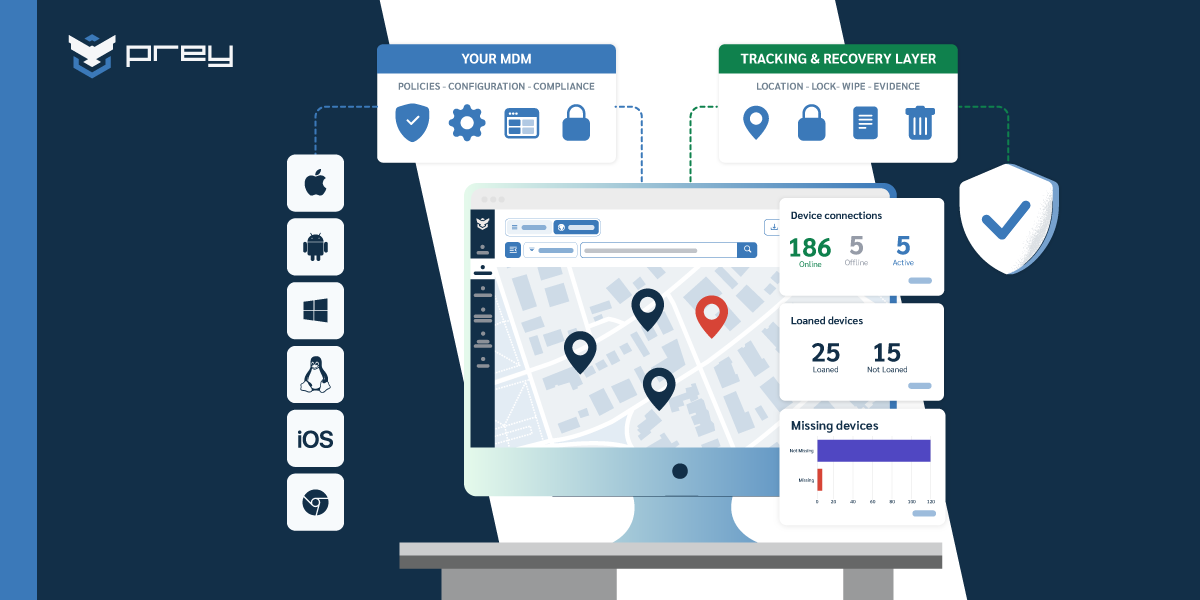
This is where a security-first MDM earns its place on the map. Prey sits at the MDM tier by scope (it manages and protects devices across Windows, macOS, Linux, Android, iOS, and Chromebook), but it leads with the capabilities the broad UEM suites tend to bolt on weakly: always-on GPS location and location history, theft-recovery evidence (camera capture, screenshots, geofencing alerts), remote lock and full remote wipe including Windows factory reset, and breach monitoring that flags exposed corporate credentials on the dark web.
Here's the operational difference in practice. A finance firm has a laptop stolen from a parked car. A typical UEM console can mark it non-compliant and queue a wipe for next check-in. A recovery-focused MDM shows the device's location history, captures a photo of whoever opens it, and produces a timestamped evidence trail for the police report and the compliance file, then wipes it. Same “manage the device” category, very different outcome when the device is the one you can't physically reach.
Be clear about scope, though. Prey is not a full UEM. App management and policy enforcement land on the 2026 roadmap, and for organizations that need to manage POS terminals and IoT under one policy engine today, a UEM suite is the right tool. The honest positioning: Prey is the strongest tracking, protection, and recovery layer, and it layers cleanly on top of an existing UEM or stands alone for fleets that need security-first device management without enterprise complexity or enterprise pricing.
Quick win: Ask of any tool you're evaluating: “If a device is stolen and never checks in again, what evidence can this produce?” Configuration tools answer “we'll wipe it on next contact.” Recovery tools answer with location, photos, and an audit trail. Know which one you're buying.
Choosing by scope, not by tier
The MDM-EMM-UEM decision gets sold as a climb. Get on the next tier, prove you're keeping up. But the tiers were never a quality ranking. They're widening circles of scope, and the right circle is the one that matches the devices you actually have to control, not the one that sounds most advanced in a board deck.
That reframe changes what you optimize for. Instead of “how far up the ladder are we?”, you ask three operational questions: Can I see every device that touches company data? Can I control it (lock, wipe, isolate) when something goes wrong? Can I produce the evidence that proves I did? The tier that answers all three for your fleet, at a cost you can defend, is the right one. For a lot of lean teams that's a well-run MDM. For mixed-OS, IoT-heavy environments it's genuinely UEM. Neither answer is more mature than the other.
Monday-morning step: write the one sentence (device types, headcount, BYOD yes/no, IT staff), then map your endpoints to the tools managing them. Where those two don't line up is your real decision, and now you can make it with a number instead of a vendor's nudge.
Frequently Asked Questions
Is UEM the same as MDM?
No. MDM (Mobile Device Management) is a subset of UEM. MDM manages mobile and often laptop devices through enrollment, configuration, lock, and wipe. UEM (Unified Endpoint Management) does everything MDM does and extends the same management to every endpoint type, including desktops, IoT, and printers, from one console. If you only manage phones and tablets, the two look nearly identical in practice.
What is the difference between UEM and MDM?
The difference is scope. MDM focuses on the device as a unit (passcode, encryption, remote wipe, location). UEM unifies management across all endpoint types and adds app, data, and cross-OS policy control inherited from EMM. UEM costs more and takes more effort to run because it manages a broader range of devices, not because it's a better version of MDM.
Is Intune a UEM or MDM?
Microsoft Intune is positioned as a UEM: it manages mobile devices, Windows and macOS workstations, and integrates with the broader Microsoft 365 ecosystem. In practice many teams use only its MDM-level features. Its mobile and GPS-tracking capabilities are limited compared to dedicated tracking tools, which is why some organizations pair Intune with a security-first MDM for device recovery.
What are the 4 types of MDM?
“The 4 types of MDM” usually refers to the deployment and enrollment models: BYOD (personal devices), COPE (company-owned, personally enabled), COBO (company-owned, business only), and CYOD (choose your own device from an approved list). Each model changes how much control IT has and what privacy the user keeps, which influences whether MDM alone or EMM-style containerization is the right fit.
Which is best for a BYOD environment?
EMM is generally the best fit for BYOD because of containerization: it separates the corporate work profile from the user's personal data, so IT can remove company access and wipe work data without touching personal apps or photos. Plain MDM can manage BYOD devices but lacks that clean work/personal separation, which creates privacy friction and offboarding risk.
Can small businesses benefit from UEM, or is it enterprise-only?
Small businesses can use UEM, but most don't need it. If your fleet is mainly phones, tablets, and laptops, an MDM delivers the same practical control at a lower price and with less to configure. UEM earns its cost when you have genuinely diverse endpoints (desktops, IoT, POS, printers) spread across multiple tools. For a narrow fleet, UEM is usually scope you pay for and don't use.
Where does EMM fit between MDM and UEM?
EMM (Enterprise Mobility Management) is the middle step. MDM manages the device; EMM adds application management (MAM), content management, and identity, mainly for mobile; and UEM extends all of that to every endpoint type, including laptops and desktops, from one console. In practice the terms blur, and most tools sold as UEM grew out of EMM. For a buyer, the label matters less than the scope: which devices and which layers (device, apps, identity) you actually need to manage. A security-first MDM like Prey covers the device and recovery layer across every OS, which you can run on its own or alongside an EMM or UEM stack.
Do you actually need UEM, or is MDM enough?
For most teams, MDM is enough. If your goal is to enroll devices, enforce security policy, track and recover them, and wipe a lost one, MDM covers it. You move up to UEM when you need to manage applications, identity, and every endpoint type (including desktops and IoT) at enterprise scale from a single pane. UEM is powerful but heavier to run and priced for it, so it's overkill for a small or mid-size fleet that mainly needs device security. Prey sits at the security-first end of the map: device tracking, lock, and wipe across every OS, without the weight of a full UEM you won't use.
See security-first device management in action
If your gap is visibility and recovery (knowing where every device is, locking or wiping it on demand, and proving what happened) that's the layer Prey is built for, across Windows, macOS, Linux, Android, iOS, and Chromebook. See how it works.