
Automating fleet security, without automating the mistakes
- Not SOAR: this is about routine endpoint actions you repeat per device (checks, alerts, locks, inventory), not SOC alert triage.
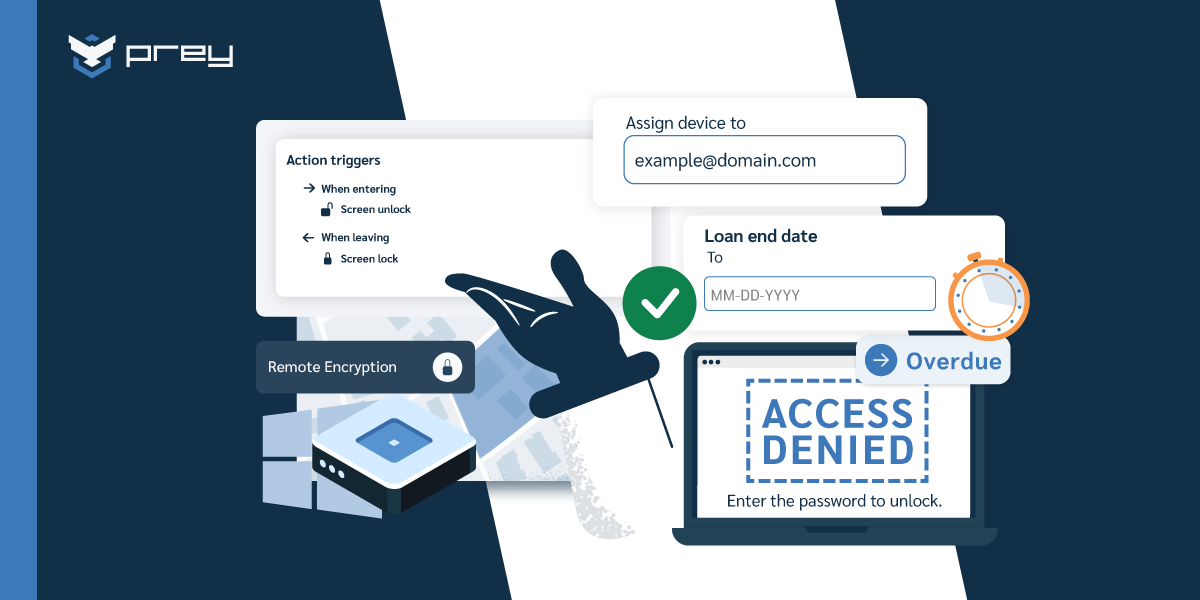
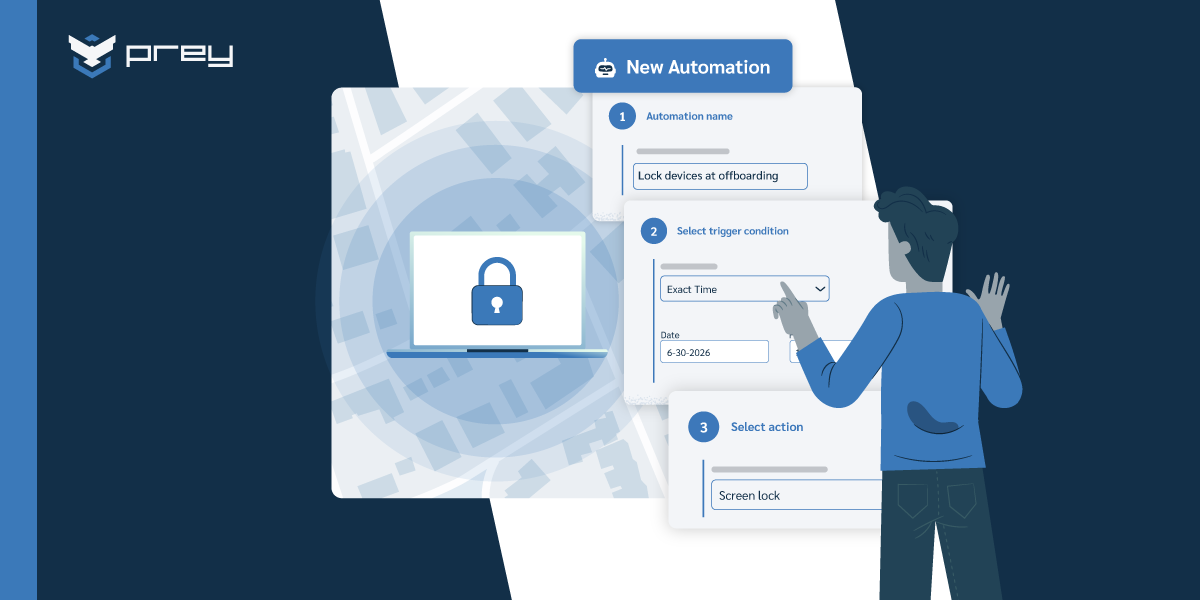
- Automate detective + reversible: scheduled inventory, missed check-in alerts, geofence-exit alerts, auto-lock on loan expiry. You can always undo a lock.
- Keep a human on the irreversible trigger: remote wipe and factory reset should wait for confirmation. That's a design choice, not a limitation.
- Scale changes the cost of manual: at 40 tenants or 2,000 student devices, the action you do by hand is the one that doesn't happen. Group, then automate per group.
- Automation is your audit trail: scheduled reports plus a log of every automated action is the evidence you hand an auditor without a fire drill.
You know the fleet grew when you stopped remembering laptops by name. One year it's twelve machines and you know every user. The next it's ninety, then two hundred, half of them remote on Fridays, and you're still doing the same three things by hand: locking a device someone reported missing, checking who hasn't reported in, and pulling an inventory nobody trusts because it lives in a spreadsheet you last touched in March.
The problem isn't that any one of those tasks is hard. It's that you're the person who has to remember to do all of them, on time, across a fleet that keeps scattering. As one IT lead running a company that's remote across several countries put it, the reality is being "a one-man shop" for devices you can't physically reach. When you're the single point of failure, the thing you didn't get to is the thing that breaks.
That's the gap security automation is supposed to close. But the word carries baggage. Search "security automation" and you land in SOAR territory: security operations centers, SIEM alert triage, playbooks for analysts who live in a queue. That's a different animal from what a lean IT team or an MSP actually needs, which is a way to make routine endpoint security actions happen across a fleet without babysitting each one.
This guide is about that second thing. What fleet security automation actually means, which actions you can safely let fire on their own, which ones should always wait for a human, and how to run automation across a mixed-OS fleet that's spread across offices, homes, and job sites.
What security automation means for device fleets
Security automation for device fleets means letting routine endpoint security actions (status checks, alerts, locks, inventory pulls, encryption verification) run on triggers or schedules across every device, instead of an admin performing each one by hand. It's distinct from SOAR, which automates alert triage inside a security operations center, and from configuration management, which automates OS and application settings.
That distinction matters because the tools you'll find when you search are built for the wrong reader. SOAR platforms assume you have a SOC. Configuration-management and infrastructure-as-code tools assume you have platform engineers writing policies as code for thousands of identical machines. Neither describes the person running security for ninety devices with no team, or the MSP juggling forty client environments.
Fleet security automation sits in a simpler place. It answers a practical question: of all the endpoint security actions you take in a week, which ones are repetitive, rule-based, and safe enough to happen on their own?
Those actions fall into three classes, and the whole rest of this guide hangs on the difference. Detective actions watch and report: scheduled inventory, encryption-status checks, missed check-in alerts, geofence-exit notifications. They observe, they don't change anything. Reversible response actions change something you can undo, like auto-locking a device when a loan expires or when it leaves a defined zone; lock the wrong device and you unlock it thirty seconds later. Irreversible response actions can't be taken back: remote wipe, factory reset. Once it runs, the data is gone.
You automate the first two aggressively. You keep a hand on the third. Everything else is detail.
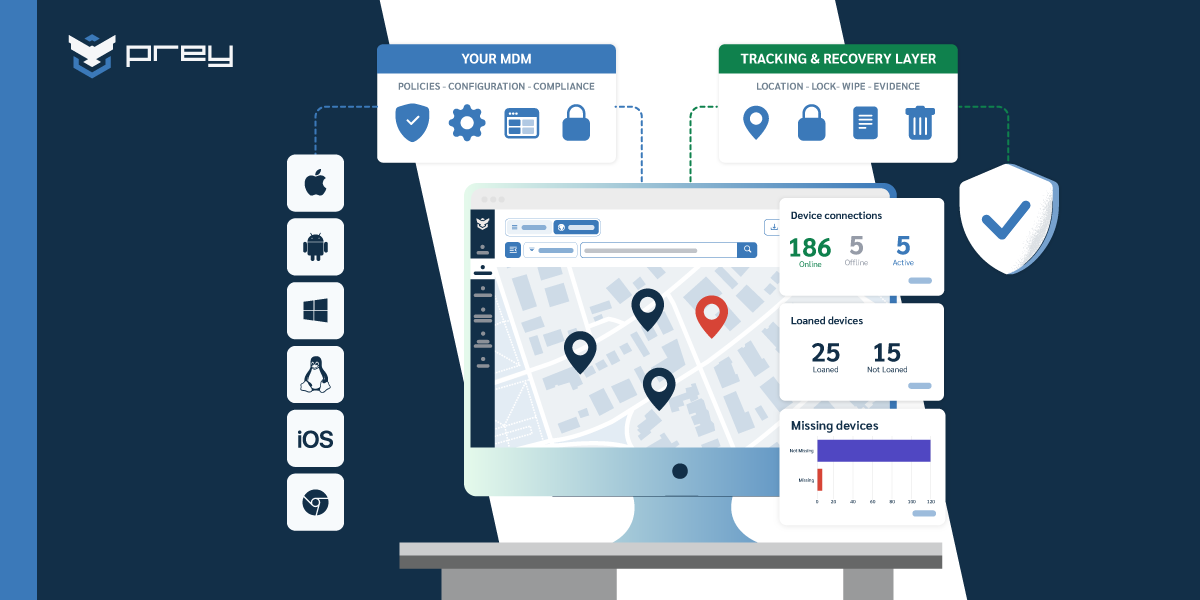
One prerequisite sits underneath all of it: you can't automate what you can't see. Automation runs on an accurate picture of the fleet, so device inventory and asset discovery is the floor, not an afterthought. A rule that auto-locks overdue loaners is worthless if half your loaners aren't in the system. If you're still deciding which platform runs this, the MDM options for SMBs is a reasonable starting map, and the broader mobile device management guide covers where automation fits in the wider lifecycle.
What should you actually automate?
Not every action is safe to hand off, and that's the real question. Start with anything detective, then add the reversible responses you'd be comfortable explaining to a user after the fact: scheduled inventory and software reconciliation, missed check-in alerts, encryption-status monitoring, geofence-exit alerts, and auto-lock on loan expiry or zone exit. All of them are read-only or trivially undone.
Think about the lean SMB running around ninety devices with one person on IT. Today that person opens the console when something feels wrong, which means problems surface late. Flip it around: a weekly scheduled inventory that flags any device silent for more than fourteen days, an alert when encryption status reads "unknown" on a machine that should be encrypted, and an automatic lock on any loaner past its return date. Now the routine runs itself and the human only shows up for exceptions. That's the shift, from checking everything to being told what's off.
Geofencing is a common automation trigger, and it's worth doing well rather than re-explaining here; the mechanics of geofencing for device security are their own topic. For automation purposes, treat a zone exit as a signal that fires a reversible action (an alert, a lock), never an irreversible one.
Here's a working decision table for a small-to-mid fleet:
| Action | Class | Safe to auto-fire? | Typical trigger |
|---|---|---|---|
| Scheduled inventory / software reconciliation | Detective | Yes | Weekly schedule |
| Missed check-in alert | Detective | Yes | No contact in N days |
| Encryption-status monitoring | Detective | Yes | Status change or schedule |
| Geofence-exit alert | Detective | Yes | Device leaves a zone |
| Auto-lock on loan expiry | Reversible | Yes | Return date passes |
| Auto-lock on geofence exit | Reversible | Yes (with care) | Device leaves a zone |
| Remote wipe / factory reset | Irreversible | No, confirm first | Manual decision |
Quick win: List the five endpoint security actions you repeat most this month. Tag each one detective, reversible, or irreversible. Automate every detective action first; you'll cut the babysitting without touching anything you'd lose sleep over.
What you should never fully automate
It's tempting to automate the dramatic move too. Don't. Detective and reversible actions are safe to fire on their own; irreversible ones (remote wipe, factory reset) should always wait for a human confirmation. This isn't a gap in your automation; it's the guardrail that keeps a misfired rule from destroying a healthy device. The goal of fleet security automation is to remove the babysitting, not to remove the judgment.
Picture the failure mode. You set an aggressive rule: any device that leaves the office geofence and misses two check-ins gets wiped automatically. It feels tidy. Then a sales rep drives to a client site with spotty coverage, their laptop drops off the network for a few hours, and your automation erases a machine full of active work. Nobody stole anything. The rule did exactly what you told it to, which was the problem.
This is where the "kill switch that fires while you sleep" fantasy falls apart. The actions worth automating are the ones you can walk back. The actions that end a device's data are the ones a person should approve, even if that approval takes three seconds. Speed still matters: teams testing Intune have reported a remote wipe taking over half an hour to actually initiate, which is its own kind of failure when a laptop is genuinely gone. The answer isn't to remove the human to gain speed. It's to make the confirmation fast and the detection automatic, so the human is deciding in seconds on a decision that's already been teed up.
Keep detection and action separate in your head. Automate the detection completely: the alert, the location fix, the lock. Then let a person pull the trigger on anything irreversible, and log every automated action so you can reconstruct what happened later.
Quick win: Audit your current rules for any automation that deletes or resets without confirmation. If you find one, split it into two steps: auto-detect and auto-lock, then a confirmed wipe. You keep the speed and lose the risk of erasing a device that was only offline.
How do MSPs automate across many device fleets?
Nobody logs into forty tenants every morning. MSPs automate at the group level, not the device level: segment devices by tenant, site, or role, attach automation rules to each group, and use mass actions for one-time sweeps, so one rule covers a client's whole fleet without touching each console.
The same pattern works for any distributed org managing more devices than it can touch by hand. Scale is what turns "manual" from an annoyance into a liability. When you manage one fleet of ninety, doing something by hand is slow. When you manage forty client fleets, the action you have to perform manually is the action that quietly doesn't happen. An MSP can't log into forty tenants every morning to check who's overdue or which devices left their site, so the automation has to be defined once per group and inherited by every device in it.
The mixed-OS reality makes this sharper. A real fleet is Windows laptops, a few Macs, Android phones, maybe iPads and a Chromebook cart, spread across locations. Automation that only understands one OS just relocates the manual work to everything else. The rules that matter (auto-lock on overdue, alert on zone exit, scheduled inventory) need to behave the same whether the device is a Windows machine in an office or an Android tablet on a job site. For the MSP motion specifically, device management for MSPs covers the multi-tenant side in more depth.
Quick win: Group your fleet by the boundary that actually predicts risk (client, site, or device role), then attach one automation rule per group instead of per device. Start with a single rule (auto-lock on missed check-in) applied to one group, confirm it behaves, then roll it across the rest.
Turning automation into audit evidence
The week before an audit is the wrong time to discover your controls left no trace. The same automation that saves you time also produces the evidence an audit asks for: a scheduled encryption report, a log of every automated lock, and an inventory that reconciles itself are exactly the artifacts you'd otherwise scramble to assemble. Automation isn't just operational hygiene; it's compliance you can prove.
Most compliance frameworks (GDPR, HIPAA, FERPA, and their equivalents) care less about whether you have a policy and more about whether you can show the control ran. "We encrypt all devices" is a claim. An automated monthly report showing encryption status across the fleet, with the exceptions flagged and resolved, is evidence. The gap between the two is where teams fail audits, and it's the gap automation quietly closes.
Consider a K-12 program with a couple thousand student devices. At the end of the year, devices come back at wildly different times, some not at all. A rule that auto-locks any unreturned device once the return window closes, plus a scheduled inventory reconciliation, does two jobs at once: it protects the data on devices still in the wild, and it produces a dated record of exactly which devices were secured and when. That record is what turns a messy collection season into an audit-ready one. The student device lending program guide goes deeper on the loaner side.
Quick win: Schedule one monthly control report (encryption status is the easiest to start with) and make sure your tool logs automated actions with timestamps. That single report plus the action log covers most of what a device-level audit request actually asks for.
How endpoint management platforms close the gap
Everything above assumes your tooling can actually do it: define rules per group, fire reversible actions automatically, hold irreversible ones for confirmation, and log all of it across every OS. That's the category of endpoint management and device security platforms, and it's worth seeing what the workflow looks like in practice.
With a platform like Prey, the pattern runs like this. You set behavior-triggered rules: auto-lock when a loaned device passes its return date, alerts when a device leaves a defined control zone, scheduled inventory so the fleet list stays current on its own. Destructive actions like remote wipe stay behind a manual confirmation by design, so an aggressive rule can't erase a device that was merely offline. Mass actions let you push a one-time change across many devices at once, and the same rules apply across Windows, macOS, Linux, Android, iOS, and Chromebook, so a mixed fleet doesn't fragment your automation.
This isn't theoretical. One US university department runs Prey alongside ServiceNow to auto-lock overdue loaned devices as part of its normal workflow. The automation is invisible until a device goes overdue, which is exactly the point. It's the "set it and forget it" security one customer described on G2, where Prey holds a 4.7/5 across 57 reviews (G2, 2026). The value isn't a dramatic remote wipe. It's the routine that no longer needs a person.
If you already run an MDM like Intune or Jamf, this layers on top rather than replacing it. You keep your policy management and add the tracking, fast reversible actions, and cross-OS automation those tools handle poorly. Seeing it run against your own fleet is the fastest way to tell whether the fit is real.
Bringing fleet security automation together
The instinct with automation is to reach for the dramatic move: the kill switch, the remote wipe that fires the moment a device misbehaves. But that's the one action you should keep your hand on. The real win is quieter and bigger. It's never again running the same lock, the same check, and the same report by hand across a fleet that keeps growing, and letting the one irreversible action wait a few seconds for a human yes.
That's what security automation for device fleets really buys you: not a dramatic remote wipe, but the end of doing routine work by hand. Automate the detective layer completely. Automate the reversible responses with confidence. Hold the irreversible ones behind a confirmation, and log everything so the automation doubles as your audit trail. Do that and you stop being the single point of failure for a fleet you can't physically reach.
Start Monday with one rule. Pick your most repeated detective action, set it to run on a schedule, and see how many console check-ins it saves you in a week. Then add the next one.
Frequently asked questions
Can security actions fire automatically across a device fleet?
Yes, for detective and reversible actions. Scheduled inventory, missed check-in alerts, geofence-exit alerts, and auto-lock on loan expiry can all run on triggers without a person. Irreversible actions like remote wipe should require a manual confirmation, so a misfired rule can't erase a device that was only offline.
Is fleet security automation the same as SOAR?
No. SOAR (Security Orchestration, Automation and Response) automates alert triage inside a security operations center, for analysts working a queue. Fleet security automation is about routine endpoint actions across your device inventory: checks, locks, alerts, and reporting. Most IT teams and MSPs need the second, not the first.
How do MSPs manage security automation across many device fleets?
By automating at the group level. MSPs segment devices by client tenant, site, or role, attach automation rules to each group, and use mass actions for one-time changes. A single rule then covers a client's entire fleet without logging into each console individually, which is the only way multi-tenant management scales.
Which type of tool supports mixed-device fleets?
Endpoint management and device security platforms that treat Windows, macOS, Linux, Android, iOS, and Chromebook as first-class are the ones that hold up on a mixed fleet. If automation only understands one OS, it just moves the manual work onto everything else, so cross-OS behavior is the feature that actually matters.
What is the best way to enforce policies like geofenced work zones per site?
Define the zone per site or group, then attach a reversible action to a zone-exit event: an alert, or an auto-lock. Keep the trigger tied to reversible responses only. Enforcing work-hour or location policies should notify and lock, never wipe, so a device that simply lost signal isn't penalized irreversibly.
Does security automation replace my MDM?
No. It layers on top. If you run Intune, Jamf, or Knox for policy and configuration, fleet security automation adds the tracking, fast reversible actions, and cross-OS coverage those tools tend to handle weakly. You keep your existing management stack and fill the operational gaps rather than migrating.
See fleet security automation in practice. Watch how behavior-triggered rules, cross-OS automation, and confirmation-gated actions work on a real fleet: get a demo.