
You already run Intune. Or Jamf, or Samsung Knox. It handles enrollment, pushes policies, keeps the fleet more or less in line. Then a MacBook goes missing on a Friday, and you realize the tool you built your whole management stack around can't tell you where it is. Or a laptop needs to be wiped now, and the wipe takes half an hour to even start. Or half your Linux boxes were never really covered in the first place.
So you start looking at a second tool, and it feels wrong. Like an admission the first one failed, or a conflict waiting to happen the moment you enroll a device twice.
Here's the thing most articles on this topic miss. They answer the narrow technical question ("can one device hold two MDM profiles?") and stop. But that's not the question you actually have. Your fleet probably already runs more than one management tool, or is about to, and what you need to know is whether that's a problem and how to make the pieces work together. This guide covers the device-level truth, why most fleets are already multi-tool, the three ways tools stack, how to make them coexist without conflicts, and when you should consolidate instead of adding anything.
Can you actually run two MDM solutions at once?
On a single device, no. iOS, Android, and Windows allow only one MDM enrollment at a time, and forcing a second profile causes conflicts: competing configuration profiles, policies that overwrite each other, and enrollment that silently fails. Across a fleet, yes. Most organizations run several management tools in parallel, each owning a different operating system or a different job. The two questions get confused constantly.
That confusion is where the trouble starts. A sysadmin reads "you can't run two MDMs," takes it as a fleet-wide rule, and either leaves a real coverage gap open or tries to force a second enrollment onto a device that already has one. On Apple devices, the enrollment is tied to a single MDM server through Automated Device Enrollment; push a second and the device doesn't obediently serve two masters, it breaks. Android's work profile model is similarly single-owner. Windows tolerates more overlap on paper, but two tools pushing competing policies is its own kind of mess.
The device-level answer is real, and you should respect it. But it's the small question. The one that actually governs how you run IT is the fleet-level question: given that no single MDM covers every OS and every job well, which tools do you run, and how do they divide the work? If you want a refresher on what an MDM is actually responsible for before layering anything on top, the mobile device management guide covers the baseline. Everything below assumes you already have that baseline and are deciding what goes next to it.
Why most fleets already run more than one management tool
Running more than one management tool is the norm, not a red flag. In a 2026 Wynter survey of 15 IT and InfoSec directors, 11 used Microsoft Intune, and nearly all of them layered a second tool on top, because no single MDM covers every operating system and every job. Prey's own 2026 demo data shows the same shape: of the organizations with an identifiable management stack, roughly one in three already ran two or more management-layer tools at once.
If you've felt vaguely unprofessional for eyeing a second tool, that's the number to sit with. The IT generalist wearing five hats at a 150-person company is not the exception when they run Intune plus something else. They're the median.
There are two honest reasons a fleet ends up multi-tool, and neither is failure. The first is operating-system coverage: your MDM manages one OS well and leaves the rest thin. The second is function coverage: your MDM handles policy and configuration but does a specific job (location, fast wipe, recovery, loaner tracking) poorly or not at all. A buyer from an IT services company in Panama put it plainly in a demo: their current MDM didn't allow continuous tracking, so they went looking for a complement, not a replacement. That sentence describes most multi-tool fleets. Nobody set out to run two tools. They hit a wall in one and added a second to get over it.
Understanding which wall you hit matters, because it determines the shape of your stack. The difference between MDM, UEM, and EMM is worth knowing here, because "just buy a UEM" is the answer vendors give and it doesn't always fit a lean team's budget or reality. There are three recognizable patterns, and naming yours is the first step to running it well.
Quick win: Audit your stack this week. Write down every tool that touches an endpoint and the one job it actually does. If two tools claim the same job, you have overlap to resolve. If one job (location, fast wipe, Linux coverage) has no tool next to its name, you have a gap.
The three ways MDM tools stack together
Not every multi-tool stack looks the same, and the differences are practical, not academic. There are three patterns. Most fleets are clearly in one.
OS-split stacking. Your MDM covers one operating system and leaves the rest naked. A shop running Intune for Windows with 40 MacBooks that Intune barely sees is the classic case. So is SimpleMDM for iPhones next to Intune for Windows, or Knox managing Android with nothing watching the computers. Fleet fragmentation forces the second tool: you didn't want two, but one OS was uncovered and you had to plug it. The trap here is treating the second tool as redundant when it's actually covering a blind spot. If your Apple management is thin, the Apple device management guide and the Windows MDM breakdown show what "well managed" looks like per OS, which helps you see what's missing.
Function-split stacking. Here your general MDM handles policy and configuration, and a specialist tool owns a job the MDM does badly. Jamf plus a tracking tool. Intune plus TeamViewer for remote access. Intune plus a dedicated patch manager. This is the most common healthy stack, and it's the one where a complement makes obvious sense: the specialist replaces a weak function, never the MDM itself. An MSP serving legal, investment, and healthcare clients described exactly why in a demo. When they tested Intune, a remote wipe took 34 minutes to initiate. For a lost laptop with client data on it, 34 minutes is not a wipe, it's a liability. So the MDM keeps doing policy, and something faster owns find-lock-wipe.
Consolidation fatigue. A minority runs two or more MDMs unhappily and wants fewer tools, not more. A team managing 500 devices across Intune and Meraki told us they wanted "one tool to combine everything." For this pattern, complement messaging backfires. These teams don't need a fourth logo in the stack; they need to simplify. If that's you, the honest move is consolidation, and how to migrate MDMs cleanly is a better next read than anything about adding a tool.
The reason to name your pattern is that each one implies a different next move. OS-split says cover the gap. Function-split says add the specialist. Consolidation fatigue says subtract. Get the pattern wrong and you'll add a tool when you should be cutting one, or cut coverage you actually needed.
How to make multiple tools coexist without conflicts
Multiple tools coexist cleanly when each device has exactly one MDM enrollment and every other tool is an agent with a clearly defined job. Conflicts come from double-enrollment, overlapping policies, and undefined ownership, not from having more than one tool. The mess isn't the second tool. It's two tools both trying to be the MDM on the same laptop.
Start with the distinction that prevents most problems: an MDM enrollment is not the same as an agent. An MDM profile takes ownership of device configuration through the OS enrollment channel, and a device gets one. An agent is software that runs on the device and does a job (tracking, remote access, backup, patch reporting) without claiming the enrollment slot. You can run one MDM plus several agents on the same laptop with no conflict, because only one of them is holding the enrollment. Try to run two MDM profiles, and you're back to the broken state from the first section.
The second rule is ownership boundaries. Every tool in your stack should own a specific job and a specific scope, written down. When two tools can both push a configuration policy, or both hold remote-wipe authority, you've built ambiguity into your incident response. The night a device goes missing is the wrong time to discover that nobody was sure which console fires the wipe. Assign it. One tool owns policy. One tool owns wipe. One tool owns location. They can be different tools; they just can't be undefined.
The third rule is compatibility testing, and it's the one teams skip. A second agent can trip your endpoint antivirus, which reads it as unknown software and flags a false positive. This came up repeatedly with teams running ESET, worried a new agent would fight their existing security stack. Test the second tool's agent against your AV and your baseline image on a handful of devices before you push it fleet-wide. If RMM sits in your stack too, the same logic applies: define where RMM ends and MDM begins so they complement rather than collide.
Quick win: Build a one-page map of tool to job to boundary. For every tool touching an endpoint, write the single job it owns and the scope it covers. Any job listed twice is a conflict to resolve now, not during an incident. Any device with two MDM enrollments needs one removed today.
Should you add a specialist tool or consolidate?
There's a fork every multi-tool fleet eventually reaches, and the two paths look similar but lead in opposite directions. The test is a single question: is the second tool closing a gap or duplicating a job? If it covers an OS you can't manage or a function your MDM does poorly, you're complementing, and adding is the right call. If two tools already do the same thing and your team is tired of context-switching between consoles, you're duplicating, and the right call is to consolidate.
The signals for adding a specialist are concrete. You can't locate a device that's off the corporate network. A remote wipe takes too long to matter. An entire OS (often Linux, often macOS) is effectively unmanaged. Loaner devices walk off and don't come back with no way to lock them. Each of these is a specific gap, and a specialist tool that owns exactly that gap is a clean addition. The head of IT infrastructure at a UK hospitality company with 300 devices named one of these directly: Jamf worked for iOS, but it failed to give them visibility for tracking lost or stolen MacBooks. That's a gap, and the answer is a tool that fills it, not a rip-and-replace of Jamf.
The signals for consolidating are just as concrete. You run two tools whose feature sets overlap by more than half. Your team maintains policies in two places and they drift out of sync. Your license spend is stacking without matching coverage. When those are true, adding anything makes the fatigue worse.
One reality shapes this whole decision: MDMs are sticky. Wynter respondents described their MDM as very hard to move off of, and they're right. Migration is a real project, so complementing is usually the lower-risk path than ripping out a working MDM. That's not a reason to complement blindly. It's a reason to be honest about whether you're closing a gap or just accumulating tools.
Quick win: Run the one-question test on every tool you're considering. Write the specific job it would own. If a tool already in your stack owns that job, you're duplicating; look at consolidation before you buy. If nothing owns it, you have a real gap and adding is justified.
Where a tracking and recovery layer fits on top of your MDM
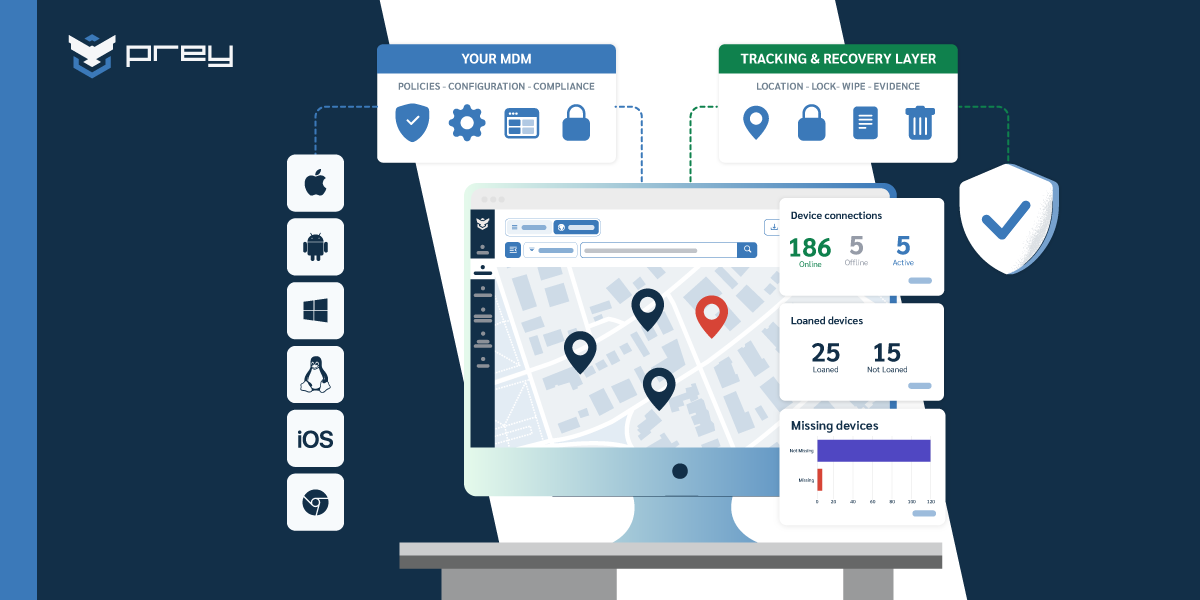
A tracking and recovery layer complements an MDM by owning the jobs MDMs tend to do weakly: always-on device location, fast remote lock and wipe, recovery evidence, loaner control, and coverage for operating systems like Linux that many MDMs ignore. Because it runs as an agent rather than a competing MDM profile, it layers onto Intune, Jamf, or Knox with no enrollment conflict.
This is the function-split pattern made concrete. The MDM keeps doing what it's good at, policy and configuration and app deployment, and the specialist layer takes the incident-response jobs. When a device goes missing, the workflow is simple: you locate it on a map, lock it remotely, pull recovery evidence if you need it, and wipe it if recovery isn't realistic. None of that touches the MDM enrollment, so nothing breaks.
The MSP with the 34-minute Intune wipe is the scenario this pattern solves. Intune stays in place managing the client's Windows fleet. A tracking and recovery tool sits on top and owns find-lock-wipe, so the next lost laptop is located and locked in seconds instead of half an hour. For teams running mixed fleets, a layer that covers Windows, macOS, Linux, Android, and iOS under one console closes the OS-split gap at the same time. MSPs stacking tools across many client environments get the same benefit at scale; how MSPs layer tools per client goes deeper on the multi-tenant version.
Platforms like Prey fit this specialist slot in environments where mixed fleets and operational simplicity matter, adding the location and recovery layer without asking you to replace the MDM you already run. If your MDM does two jobs poorly, that's the shortlist to trial it against.
Conclusion
You can't run two MDMs on the same device. That part is settled by the operating systems themselves, and no strategy changes it. But that was never the real question. Your fleet is almost certainly already running multiple management tools, and the teams that run them well aren't the ones who picked a single platform. They're the ones who gave each tool one job, one boundary, and one enrollment per device, then made the pieces coexist instead of compete.
So the next move isn't choosing the one true tool. It's naming your pattern. If you're OS-split, cover the gap. If you're function-split, add the specialist that owns what your MDM does badly. If you're drowning in overlapping consoles, consolidate before you add anything. Monday morning, take fifteen minutes and write the tool-to-job-to-boundary map for your stack. The gaps and the overlaps both show up immediately, and that one page tells you whether your next decision is to add, to subtract, or to leave things exactly as they are.
FAQ
Can you have two MDM profiles on one device?
No. iOS, Android, and Windows allow only a single MDM enrollment per device, and pushing a second profile causes conflicts like competing policies and failed enrollment. You can, however, run one MDM alongside agent-based tools on the same device, because agents don't claim the enrollment slot.
Can you use Intune and another management tool together?
Yes, across a fleet. Intune commonly runs alongside a Mac-management tool or a specialist tracking and recovery agent. Keep one MDM enrollment per device and let the second tool own a distinct job, such as location or fast wipe, and the two coexist without conflict.
Is it bad to have multiple MDM solutions?
Not inherently. In a 2026 Wynter survey of 15 IT directors, 11 ran Intune with a second tool layered on top. It only becomes a problem when tools overlap without defined ownership or a single device gets double-enrolled into two MDMs.
What happens if you enroll a device in two MDMs?
On most platforms the second enrollment fails or the profiles conflict, because iOS, Android, and Windows recognize only one MDM owner per device. The exception is running an MDM alongside an agent-based tool, which doesn't claim the enrollment slot and coexists cleanly.
Does running two tools cause conflicts?
Only if both try to be the MDM on the same device, or their policies and remote-wipe authority overlap. An MDM plus an agent-based specialist coexist cleanly, because only one tool holds the enrollment and each owns a defined job.
Can Prey run alongside Intune or Jamf?
Yes. Prey runs as an agent, not a competing MDM profile, so it layers on top of Intune, Jamf, or Knox without an enrollment conflict. It adds always-on location, fast remote lock and wipe, and recovery for the devices and operating systems your MDM covers weakly.