
It's 6 p.m. and the shift changes at the front desk. The clerk who handed out three loaner laptops this morning has gone home, and the person taking over has no idea which of the forty devices in the drawer are still checked out. A guest is asking for one. Somewhere there's a spreadsheet. Maybe it's current.
Multiply that by every hotel, library, campus, municipal office, and Device-as-a-Service provider that hands hardware to people who don't work for them, and you get the quiet problem nobody puts in a budget line: loaner fleets that slowly leak. One IT manager running loaner laptops for a hotel put it plainly: "guests frequently walk away with company property." A technical college library described a device that had been "missing for over a year with no way to track or retrieve it."
Loaner device management is the discipline that keeps that from happening. Not the spreadsheet itself, but the system underneath it. This guide covers what a loaner program actually is across verticals, why fleets leak, how to build one that recovers itself, and where a dedicated tracking layer fits on top of the tools you already run.
What is loaner device management?
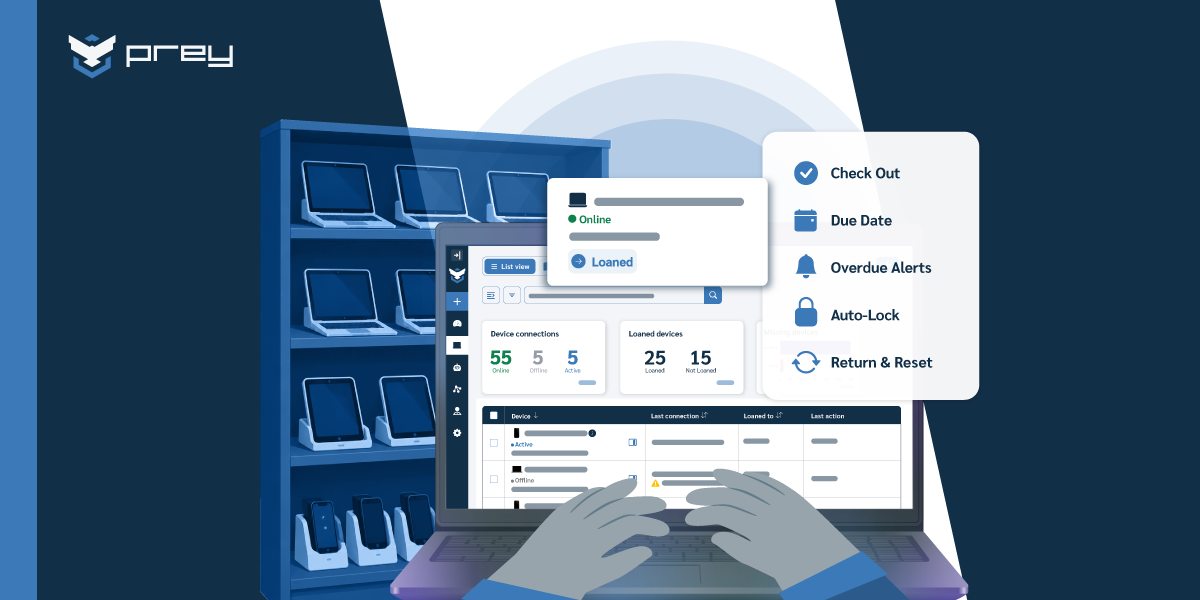
Loaner device management is the process of assigning, tracking, and recovering shared devices that an organization lends temporarily to people outside its permanent staff, or to employees who need a spare. It covers the full loan cycle (check-out, active use, due date, return, and reset) across laptops, tablets, and phones on any OS.
The word "loaner" hides how many different operations this actually describes. A university library lends laptops to students by the hour. A hotel keeps a drawer of tablets for guests. A municipal IT office issues spare notebooks to directors traveling between offices. A Device-as-a-Service provider ships fleets to clients and has to get them back when the contract ends. A 40-person company keeps a shelf of spare laptops for onboarding, repairs, and the occasional contractor. Different verticals, same underlying job: the device belongs to you, the person holding it doesn't, and at some point it has to come home.
That last part is what separates loaner management from ordinary inventory. A permanently assigned laptop has one owner and stays with them until they leave. A loaner has no fixed owner. It rotates through many hands, and every rotation is a chance to lose track of it. The management problem isn't knowing what you bought. It's knowing, right now, what's out, who has it, and whether it's overdue.
This is a subset of broader device loan management, and it sits inside the bigger discipline of fleet visibility. But loaners deserve their own attention because they fail differently. A regular fleet leaks slowly through offboarding gaps. A loaner fleet leaks constantly, by design, because lending is the whole point. The goal isn't to stop lending. It's to make return automatic instead of hopeful.
Why loaner fleets leak
Loaner devices don't come back for one structural reason: return depends on memory and a static list instead of a scheduled action. When nobody owns the due date and nothing happens automatically once it passes, a device stays out until someone happens to notice, and by then it's often already gone.
The leak starts at four predictable points. The first is the stale spreadsheet: most programs begin in a shared sheet, and it stops matching reality the first week someone lends or returns a device without logging it. A retail IT lead described managing roughly 90 computers "mediante una planilla Excel" and knowing it's stale the moment they open it. The second is the lack of physical oversight: once a device leaves the desk, nobody is watching it, and one K-12 district running 2,000 devices reported that "students lose their laptops, typically four or five devices per year." The third is return timing: nothing forces a due date, so a "borrow it for the afternoon" laptop becomes a "still has it in March" laptop. The fourth is zero visibility: when a device is finally declared missing, most teams have no last-known location and no way to act. That's how a college library ends up with a device "missing for over a year." The leak wasn't the theft. It was the year of not knowing.
Quick win: Reconcile your loaner list against physical reality this week. Walk the shelf, match every device to a current borrower, and flag anything you can't account for. Whatever number of "unknowns" you find is your real starting exposure, and it's usually higher than the sheet suggests.
Building a loaner program that returns itself
A loaner program that recovers itself (a laptop loaner program for staff, or a mixed tablet and phone fleet) rests on three parts working together: a clear agreement, a scheduled loan period, and an enforcement action that fires on its own when the period ends. Miss any one and you're back to chasing people.
Start with accountability. Every loan needs a record that ties a specific device to a specific person for a specific window. That's not bureaucracy; it's the thing that makes recovery possible later. At minimum, capture the device identifier (serial or asset tag), the borrower's name and contact, the checkout date, the agreed return date, and the condition at handoff. If your program is large enough to have disputes, a short loan agreement the borrower acknowledges is worth the friction. It needs to establish that the person knows the device is tracked, knows when it's due, and knows they're responsible for it.
Then schedule the loan period. A loan without a due date is a donation. Set a default period that fits the context (hours for a library kiosk, a semester for a student device, the contract term for a DaaS fleet) and attach it to the record, not to someone's memory. The due date is what everything downstream keys off.
Finally, build enforcement into the schedule instead of bolting it on after. Enforcement is a sequence, not a single event: a reminder before the due date, an overdue alert the moment it passes, and an escalating action (a lock, an on-screen message, a support ticket) when the device stays out. That shifts the IT team's job from "remembering to chase" to "reviewing exceptions," which is the only version of this that survives contact with a busy week.
Quick win: Make a due date a required field on every loan, and set a reminder to fire a few days before it. Half of overdue returns aren't defiance; they're people who simply forgot, and a reminder recovers them before you have to escalate.
Automating the return loop: overdue alerts and auto-lock
Here's where most programs stall. You can write the perfect agreement and still spend Fridays sending "hey, is that laptop coming back?" emails, because the enforcement step is manual. The fix is to let the schedule trigger the action.
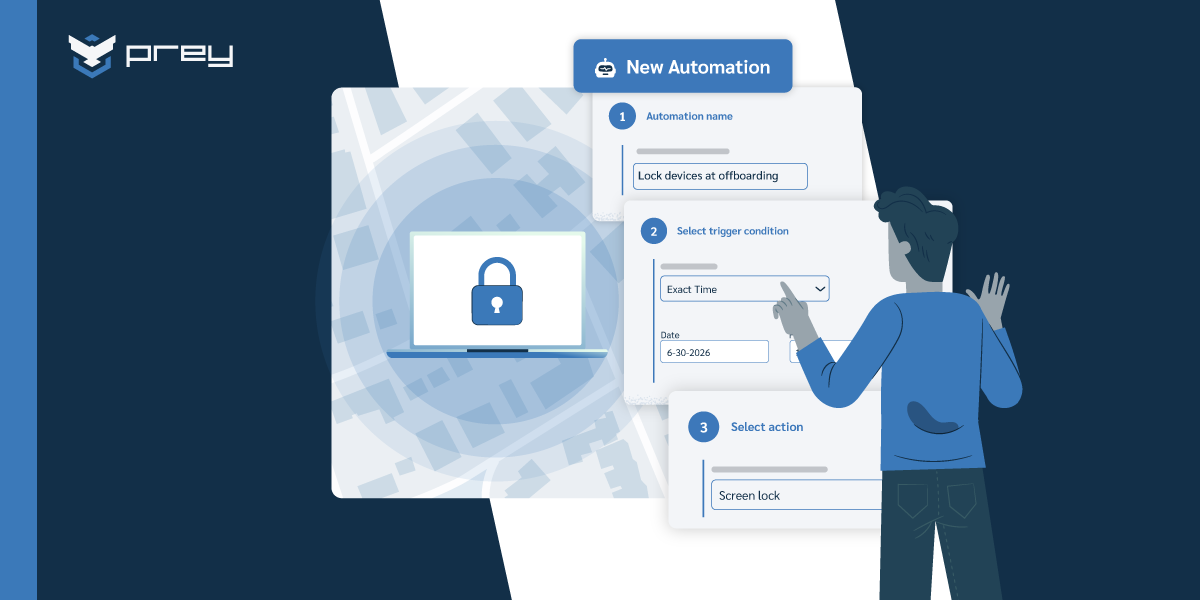
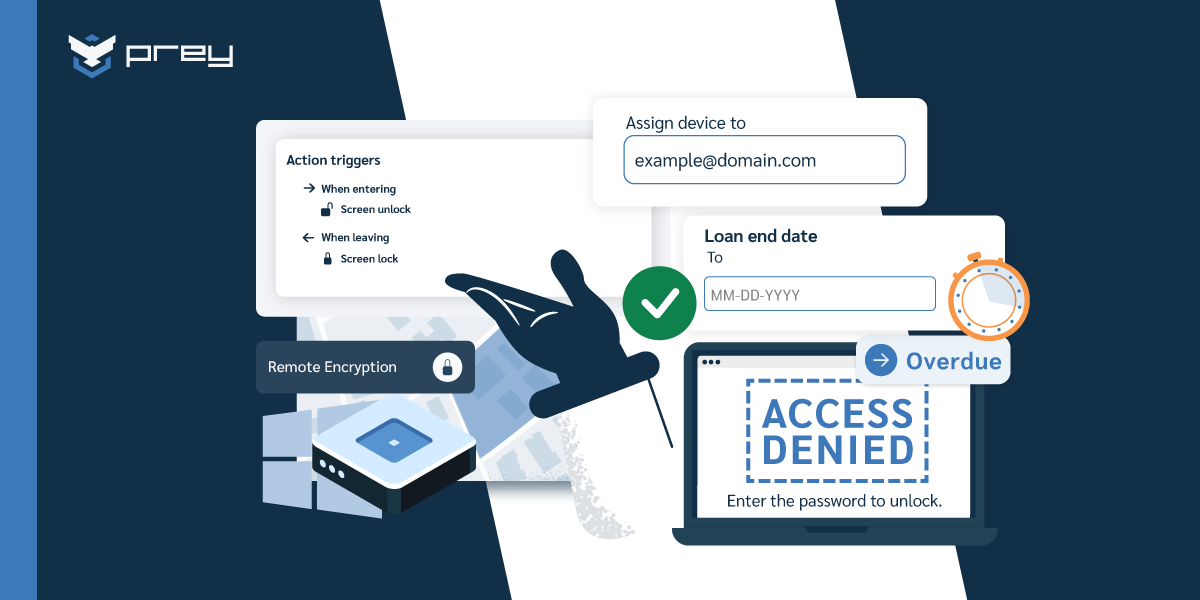
Automated, the return loop is straightforward. Loan periods are set per device. A reminder goes out before the due date. If the device isn't returned, an overdue alert fires to IT. If it stays out past a grace threshold, the device locks on its own, ideally with an on-screen message telling the holder how to return it. If it's genuinely missing, you fall back to last-known location and check-in history to tell a forgotten loan from a real loss. Underneath all of it, an audit trail records who had what and when it came back. That's exactly the evidence an inventory review or auditor asks for.
This is the part where a device management platform earns its place. Tools built for device visibility, like Prey, treat the loan as a scheduled object: you set the loan period, and overdue devices can auto-lock when it expires, with alerts and last-known location handled automatically. One Network Administrator described the appeal precisely in a G2 review: "we also do a loaner program on assets, and we really like the feature of setting up an auto lock on the device when the asset is supposed to be turned back in." A university runs the same idea wired into ServiceNow, auto-locking loans the moment they go overdue. And the payoff shows up in returns: an e-learning provider reported that locking devices "with messages to get them returned to us" pushed "the percentage of returns" up. Control Zones add a physical boundary on top, so a device that leaves the campus or building can trigger an alert on its own.
What happens when a loaner doesn't come back?
The honest answer matters here, because your audience will ask. If a device is offline, the lock and location commands queue and execute the next time it checks in. If someone reinstalls the OS, an OS-level agent doesn't survive a factory reset (no software agent does), which is why full-disk encryption is the real backstop for the data even when the hardware is gone. Location history tells you whether a device is forgotten or lost. None of this is magic. It's the difference between "we have no idea" and "we know where it was last, and it will lock the moment it reconnects." If you're weighing a loaner tool, that gap is the thing to test. Try it against your own overdue fleet with a 14-day trial before you decide.
Should you use your MDM for loaner devices?
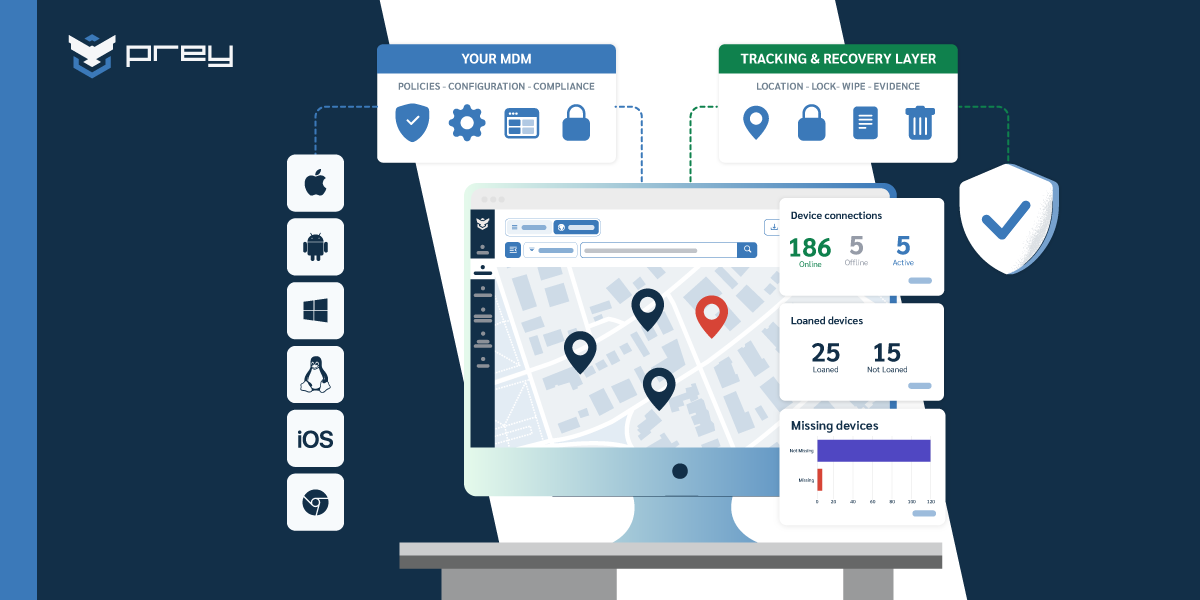
You can use your MDM for basic loaner inventory, but most MDMs manage device policy, not the loan lifecycle. They rarely track a due date, fire an overdue alert, or auto-lock on expiry. For loaner-specific control, teams usually add a dedicated tracking layer on top of the MDM they already run.
This isn't a knock on MDMs; it's a scope question. Microsoft Intune, Jamf, and Samsung Knox are strong at enrollment, configuration, and policy enforcement. But "this laptop is due back Tuesday and should lock itself Wednesday if it isn't" is loan logic, not policy logic. Ask a general-purpose MDM to run a lending program and you end up rebuilding due dates and reminders by hand, which is the manual process you were trying to escape.
That's why so many teams arrive already thinking in complement terms. An IT services lead in Panama framed it exactly right: "our current MDM doesn't allow continuous tracking; we're looking for a complement, not a replacement." Jamf shops run it for Apple management and add a tracking layer because Jamf "fails to provide the visibility for tracking lost or stolen MacBooks." The loaner use case sits squarely in that gap: the MDM keeps the fleet configured and compliant, and a lighter tool handles loans, location, and recovery.
Quick win: Open your MDM and try to answer one question: which loaner devices are overdue right now? If there's no clean way to get that answer, you've found the gap. That's the function a dedicated loaner layer fills, and it's worth mapping before you add another tool.
Loaner playbooks by context
Loaner management isn't one program; it's a pattern you adapt to who's borrowing and what they can walk off with. The mechanics are the same (agreement, due date, enforcement), but the risk profile and the control that matters most shift by vertical. Pick the row that looks like your operation and build for that failure mode first.
Education is the most mature version and has its own dedicated tooling around school loan programs and 1:1 device programs in schools, often tied into the broader MDM for education stack. If you're running a 1:1 technology program, start there.
The corporate spare pool is the one most teams underestimate, because it overlaps with offboarding. A small-business IT lead told this story on G2: "we have about 30 company laptops that get loaned out to the team and there was a time when someone left the company and took the laptop with them. I started putting Prey on all the laptops so I can see where they are on a map and even remote lock the device." That's the spare-pool failure mode in one sentence: the loaner walks out during a departure, and without tracking, it's just gone. Frame the recovery as part of a normal offboarding process, not as chasing a person, and the control stays proportionate.
Quick win: Name one owner for the loaner program, and pick the single failure mode from the table above that would hurt most in your context. Build the control for that one first. A program that reliably handles your worst case beats a generic one that half-handles all five.
The program is the control, not the list
The pattern that ties every vertical together is simple, and it's the thing leaked programs miss: a loaner program isn't a list of who has what. It's a system that gets the device back on its own. The spreadsheet tells you what should be true. The schedule, the due date, and the automatic lock are what make it true when a shift changes, a semester ends, or an employee leaves without saying goodbye to the hardware.
The demand for this is quietly everywhere. In a 2026 review of two dozen Prey sales conversations, about one in four involved managing a loaner fleet, and not just in schools: hotels, pubs, libraries, universities, municipalities, and DaaS providers all described the same leak. The common thread was never "we can't buy devices." It was "we can't get them back."
So the Monday-morning move is small and concrete. Look at your loaner fleet and answer one question honestly: if a device goes out today, what forces it to come back? If the answer is "someone will remember," you don't have a program yet. You have a shelf and some optimism. Attach a due date, wire an alert to it, and let the overdue devices lock themselves. That's the whole difference between a loaner fleet that recovers and one that leaks.
Frequently Asked Questions
What is a loaner device?
A loaner device is a laptop, tablet, or phone that an organization lends temporarily instead of assigning permanently. It rotates through many users (students, guests, staff, or clients) and is expected to be returned after a set period. Because it has no fixed owner, a loaner needs active tracking and a defined return process to avoid being lost.
How do you manage a loaner device program?
Manage a loaner program with three components working together: a loan record tying each device to a borrower and a due date, a scheduled loan period, and an automatic enforcement step (a reminder, an overdue alert, then a lock) when the device isn't returned. Add location tracking so a genuinely missing device can still be recovered. The goal is to make return automatic rather than dependent on memory.
How do you make sure loaner devices get returned?
The reliable method is to attach a due date to every loan and let it trigger action on its own: a reminder before the date, an alert when it passes, and an auto-lock if the device stays out. On-screen return messages and last-known location help recover devices that are forgotten rather than stolen. Teams that add auto-lock and lock messages consistently report higher return rates than manual chasing.
What happens if a loaner device isn't returned or goes offline?
If the device is offline, lock and location commands queue and run the next time it checks in. Location history helps distinguish a forgotten loan from a real loss. If someone reinstalls the OS, a software agent won't survive a factory reset, so full-disk encryption is the real safeguard for the data. You won't always recover the hardware, but you can protect what's on it and know where it was last seen.
Should you use an MDM or dedicated software for loaner devices?
Most MDMs (Intune, Jamf, Knox) manage device configuration and policy, not loan due dates, overdue alerts, or auto-lock on expiry. You can track basic inventory in an MDM, but the loan lifecycle usually needs a dedicated layer on top. Many teams keep their MDM for policy and add a lighter tracking tool for loaners, tracking, and recovery, rather than replacing anything.
What should a device loan agreement include?
A device loan agreement should capture the device identifier (serial or asset tag), the borrower's name and contact, the checkout and due dates, the device condition at handoff, and an acknowledgment that the device is tracked and must be returned. It doesn't need to be a formal legal contract; it needs to establish accountability and a clear return date the borrower has seen.
See where every loaner is, and set it to lock itself the day it's due back
Prey tracks your loaner fleet across Windows, macOS, Linux, Android, and iOS, schedules loan periods, and auto-locks overdue devices so return stops depending on anyone's memory. Start a 14-day trial or book a demo.